

OpenClaw has open sourced essentially the operating system of agent computers.
To understand why OpenClaw matters, you need to understand the problem it solved — and why no big company solved it first.
By late 2025, the AI industry had produced extraordinary models. Claude, GPT-4o, Gemini — these were genuinely remarkable reasoning engines. But they all shared a fundamental constraint: they lived inside chat windows. You opened a browser tab, typed a question, read the answer, closed the tab. The model forgot you existed the moment the conversation ended. Every session started from zero.
The models could think. They just couldn’t do anything.
This was not a technical limitation of the models themselves. It was an architectural choice about how they were deployed. The models were powerful engines sitting in neutral — capable of extraordinary reasoning, but disconnected from the systems, files, and services where actual work happens.
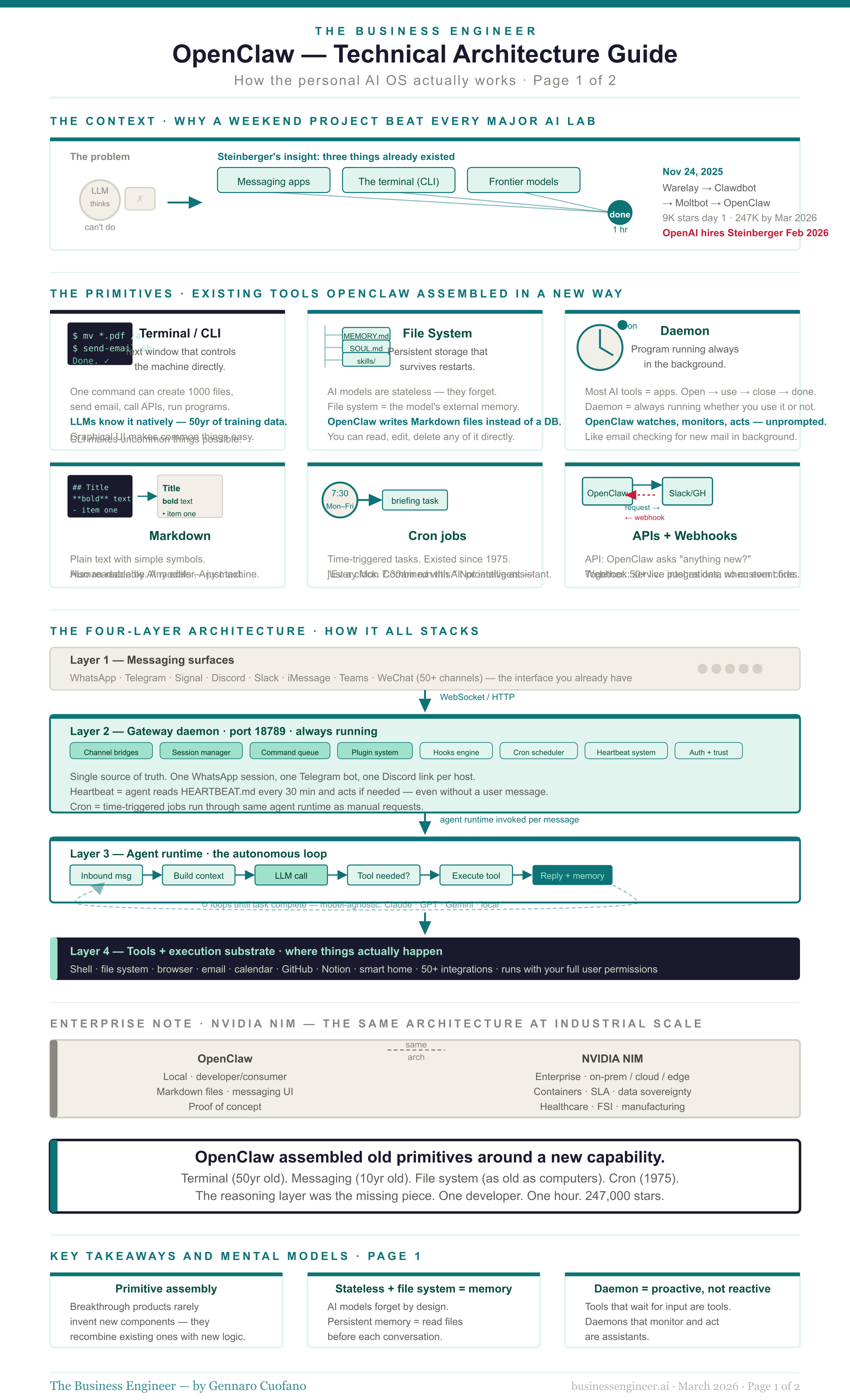
Meanwhile, three things were quietly converging in the developer world. First, frontier models had become genuinely capable of writing and executing code — not just generating text that looked like code, but actual working programs. Second, the command line had never gone away. Every computer — Mac, Windows, Linux — still had a terminal through which software could control the machine directly: create files, run programs, send emails, call APIs, schedule tasks. Third, messaging apps had become the dominant communication layer for most knowledge workers — WhatsApp, Telegram, Slack were where people actually lived.
Peter Steinberger, an Austrian developer who had previously built and sold PSPDFKit (now Nutrient), a PDF software company, saw the combination. In November 2025, he spent roughly one hour connecting these three things: a messaging app, a frontier model, and a terminal. The result was the first version of what would eventually become OpenClaw.
He called it Warelay at first — a portmanteau of “WhatsApp Relay.” Then Clawdbot. Then, Moltbot, after Anthropic’s legal team flagged the phonetic similarity to “Claude.” Then, OpenClaw, three days later, when Moltbot never quite grew on him. The lobster mascot survived every name change.
He did not think it was significant. He assumed large companies would build the same thing within weeks. Google didn’t. OpenAI didn’t. Anthropic didn’t.
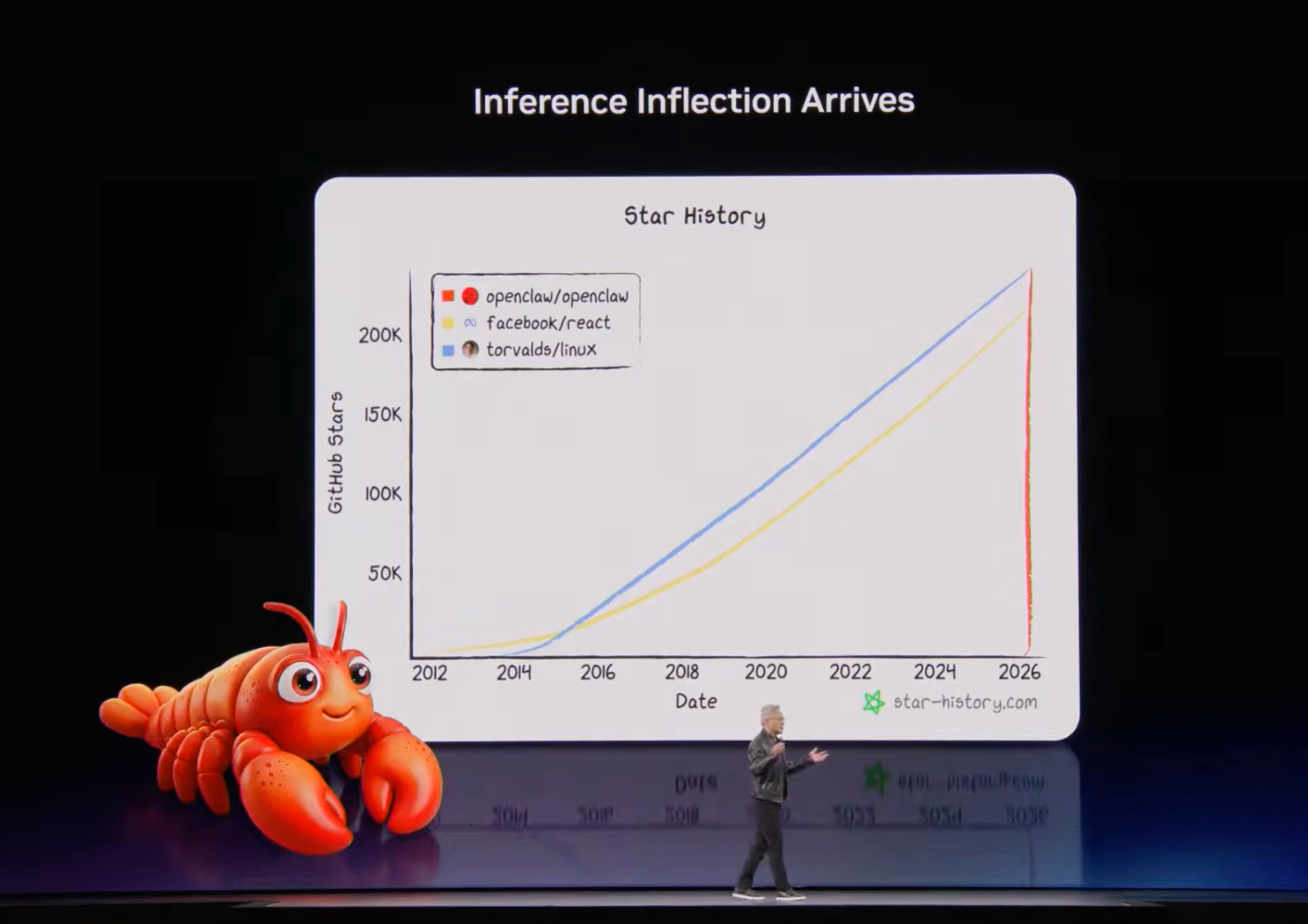
So the “small toy” kept growing. When he publicly launched the project on January 25, 2026, it received 9,000 GitHub stars in 24 hours — faster than almost any open-source project in history. By March 2026, it had reached 247,000 stars, surpassing React, Docker, and Kubernetes.
Steinberger joined OpenAI in February 2026 to lead their personal agents division. OpenClaw continued under an independent open-source foundation.
The question worth sitting with: why did one developer build in one hour what no major AI company had shipped in two years? The answer is not just technical.
Before the Architecture: Understanding the Primitives
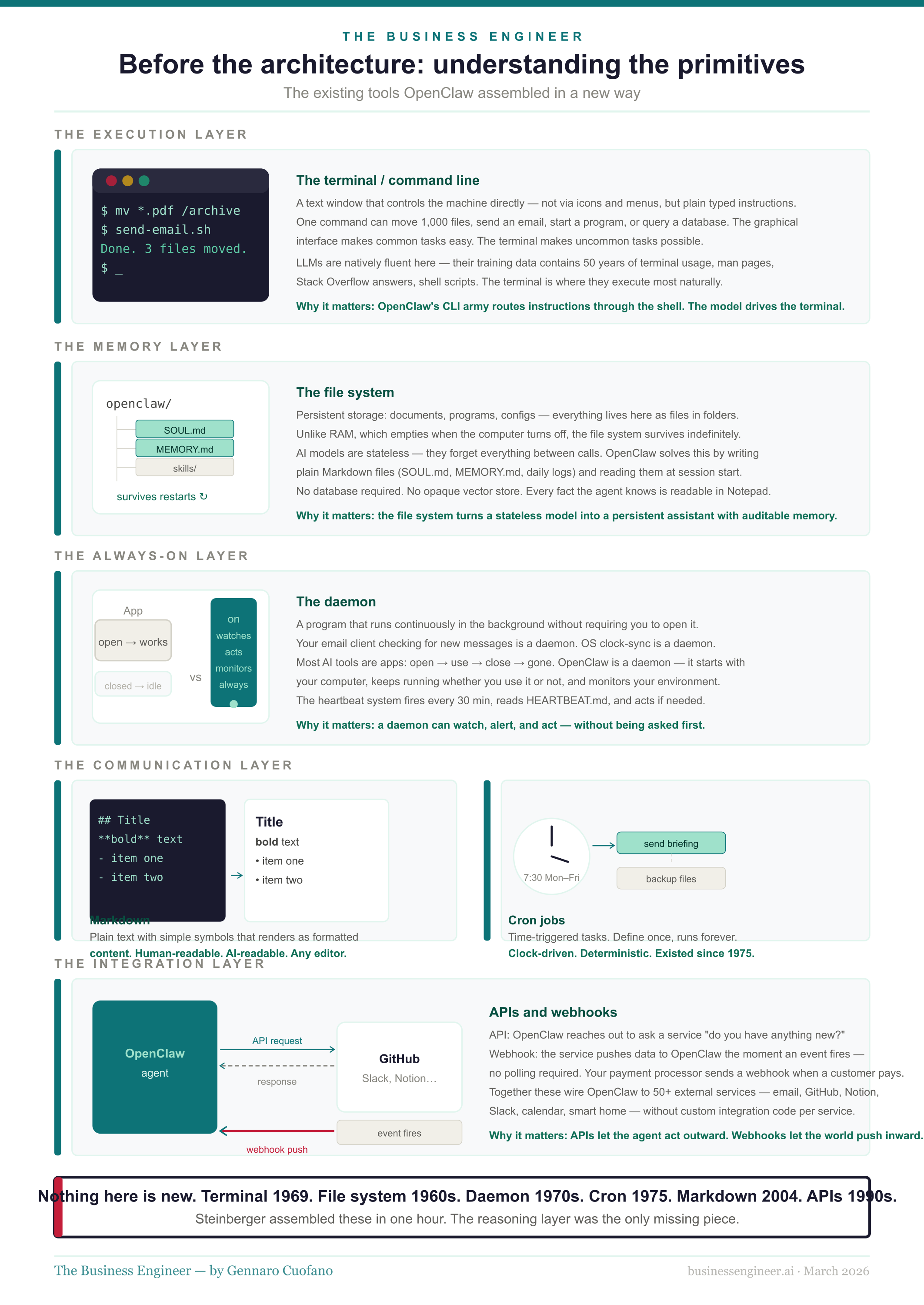
Before explaining how OpenClaw works, it is worth explaining the underlying building blocks it uses — the tools that have existed for decades and that OpenClaw assembled in a new way. For a software engineer, these are obvious. For a business leader, they are worth a minute.
The Terminal and the Command Line
Every computer has two ways of being controlled. The first is the graphical interface — windows, icons, menus, buttons. This is what most people use. The second is the terminal, also called the command line or the shell. The terminal is a text window where you type instructions directly, and the computer executes them immediately.
The terminal is powerful in ways the graphical interface is not. A single command in the terminal can create a thousand files, rename an entire directory, send an email, query a database, call an API, start or stop a running program, or schedule a task to repeat every morning at 7 am. Graphical interfaces make common tasks easier. The terminal makes uncommon tasks possible.
For decades, the terminal required human expertise. You had to know the syntax. You had to know what was available. You had to debug errors yourself. This expertise barrier kept the terminal’s power locked inside a relatively small community of developers and system administrators.
What changed in 2024 and 2025 was that frontier models became genuinely good at the terminal — not because the terminal changed, but because the models’ training data included decades of terminal usage, documentation, and code.
A model like Claude has effectively read every man page, every Stack Overflow answer, every Linux tutorial ever published. It knows the terminal natively. When you ask it to do something on your computer, its first instinct is to reach for a shell command — because that is the most direct, most reliable, most composable way to execute on a computer.
OpenClaw’s insight was to put a conversational interface in front of the terminal and let the model do the driving.
The File System
A file system is the structure by which a computer organizes and stores information. Every document, every image, every program, every configuration — all of it lives in the file system as files organized into folders. The file system is persistent: it survives when the computer is turned off, when programs close, when sessions end.
This matters because AI models, by design, have no persistence. A model like Claude processes a conversation and then forgets it entirely. Every new conversation is a blank slate. This is the fundamental architectural tension in building a useful AI assistant: the model is stateless, but useful assistants need memory.
OpenClaw’s solution is elegant and obvious in retrospect: use the file system as the model’s memory. Instead of building a complex database, OpenClaw writes plain text files. It reads them back when needed. The file system serves as the persistence layer the model itself lacks.
Markdown
Markdown is a lightweight text format. You write plain text with simple symbols — asterisks for bold, hashes for headings, hyphens for bullet points — and it renders as formatted content. It is human-readable as raw text, and it renders cleanly as formatted documents.
OpenClaw uses Markdown for almost everything: memory files, instructions, skill definitions, and logs.
This is a deliberate choice. A Markdown file can be opened in any text editor on any computer without special software. You can read, understand, and edit it directly.
It can also be read by any AI model — it is just text. The entire intelligence layer of OpenClaw — its memory, its personality, its capabilities — lives in files you could open in Notepad.
Daemons and Background Processes
A daemon is a program that runs continuously in the background on a computer, doing work without requiring you to actively interact with it. Your email client checking for new mail every few minutes is a daemon. Your operating system’s clock synchronization is a daemon. Antivirus software scanning files in the background is a daemon.
Most AI tools are not daemons. They are applications: you open them, use them, close them. They stop working the moment you stop using them.
OpenClaw runs as a daemon. It starts when your computer starts, runs continuously in the background, and keeps working whether you are actively using it or not. This is what allows it to monitor your email, execute scheduled tasks, check the status of a deployment, and message you with updates — all without you having to open an application and ask.
APIs and Webhooks
An API (Application Programming Interface) is a standardized way for software to talk to other software. When your accounting app sends data to your bank, it uses an API. When a website shows you weather data, it is calling a weather service API. APIs are the connective tissue of the modern software world — they let applications share data and functionality without being built by the same team.
A webhook is the reverse: instead of your software asking “do you have anything new for me?” on a schedule, a webhook lets an external service push information to your software the moment something happens. Your payment processor sends a webhook when a customer pays. Your CI/CD system sends a webhook when a build fails.
OpenClaw uses APIs to reach out to external services — sending emails, querying databases, posting to Slack, and checking GitHub. It accepts webhooks to receive information — new messages arriving, events completing, and alerts triggering. This is how it integrates with 50+ external services without those services needing to know anything about OpenClaw.
Cron Jobs
Cron is a time-based task scheduler that has existed on Unix systems since 1975. The name comes from the Greek word for time. A cron job is a task you define once, attach a schedule to, and let the system execute automatically at the specified intervals. “Run this backup script every night at 2am.” “Send me this report every Monday at 9am.” “Check this API every 15 minutes and log the result.”
Cron jobs are not fancy. They are not intelligent. They are just time-triggered commands. But combined with an AI agent that can interpret results, take action, and communicate findings, they become something much more useful: the scheduling backbone of a proactive assistant.